Category: Video editing

  • How I use AI in my creation process

    How I use AI in my creation process

    The AI slop on my feeds is getting out of hand. And I’m talking about uninspired trash that almost no human touched. Take YouTube for example: recently I was on the hunt for sound effects and the top results were AI generated videos with non-matching SFX on them. 1 word: horrible.

    That being said, I’m not against using AI when creating content. The truth is, I’m an avid user of AI myself. The difference? Intention and craft. There is a time and place to use AI, in my opinion. So let me walk you through how I use AI as a tool, not a shortcut in my creation process.

    1. Concept visuals

    Before AI, I used to spend tons of time in the concepting phase looking for the perfect images to visualize my concepts. Thanks to AI, I cut down on time for that part of the process, which I now spend on refining my concepts even more. A win-win, if you ask me.

    Another thing I recently started experimenting with is AI workflows. This allows you to combine multiple AI models together in one. I use it to go from a loose concept to a full-on video storyboard in no time.

    2. Text

    After writing my copy, I use AI as a proof reader. Having an extra set of eyes on your copy never hurts and the fact that I can now quickly get feedback on basic grammar and spelling is perfect.

    Claude

    3. Photography

    In Lightroom, I use the occasional AI feature to enhance my photos, primarily focussing on the AI masking options. I still prefer to do the heavy lifting myself when it comes to editing and color grading my pics, instead of letting AI do the creative work.

    On top of that, when a pic isn’t framed ideally, I like to use generative fill in Photoshop to solve that problem.

    4. Graphic design

    Yes, AI does have its place in the design process, but you need to be strategic about it. The main way I use it, is when a design calls for a more fantastical approach. Like putting a car in a futuristic setting. Generating those types of background in Nano Banana or Midjourney works like a charm.

    But whenever a design requires a realistic, human approach, I try to steer clear from AI. Viewers aren’t dumb and can spot AI from a mile away, so this is the perfect example of when you shouldn’t be using it.

    5. Videography

    I’m definitely still in the learning phase when it comes to videography. And lighting is one area where I still have room to grow. So I use conversational AI like ChatGPT or Gemini as my gaffer, by simply asking how to place my lights to get the end result I’m after. This way I can quickly start shooting, while also learning how to tackle lighting correctly in the future.

    6. Editing

    When editing in Premiere Pro or After Effects, I use AI to get rid of distracting elements in my video. Meaning generative fill (in Photoshop) if that part of the video isn’t moving, or Runway/Kling when that distracting element is a dynamic part of the video. I apply the same method if the framing of my video isn’t quite there. Or if I don’t have enough footage, I have used Runway or Kling to animate one of the many pictures I did take.

    Within Premiere Pro, I also use the voice enhance feature to enhance the dialogues and voiceovers I record for my videos.

    And lastly, I’m a big fan of the speech-to-text feature that both Premiere Pro and Capcut have. It makes adding subtitles quite an easy task.

    Voice enhancer in Premiere Pro

    7. Voiceovers

    Gone are the days that adding voiceovers to your work is a costly process for which you have to cast actors. I’ve both used HeyGen and ElevenLabs to add voiceovers to my work. Of course, you do need to do some finetuning to get the tone-of-voice just right. But even that part of the process has become so much easier as the tools evolve by the minute.

    So yeah, I’m not against using AI in content creation. But I use it to enhance my process, not to replace my creative input. AI allows me to work smarter and faster, but the creative decisions, the concepts and final touches are mine. And that’s exactly what seperates good content from AI slop.

    Want more of my creative input? Check out my recent videography adventure in which I filmed a cheesecake disaster.

  • Project of the week: baking a horrible cheesecake

    Project of the week: baking a horrible cheesecake

    This week’s project: filming a cheesecake disaster. 🙈 Yep, the cake was disgusting, but the video turned out pretty decent. Here’s what I learned from my latest videography challenge.

    You may or may not know: I’m currently enrolled in a videography course through SyntraPXL. I always wanted to deepen my videography skills, but I’m the type of person that learns faster from experts than on my own. So with some free time on my hands right now, I thought this was the perfect opportunity to start the course I had my eye on since 2020.

    @anneleenvaes Ik maakte een cheesecake met een recept van Pinterest en het was (zoals verwacht) too good to be true 🙈 #foodie #foodvideography #cheesecake ♬ origineel geluid – Anneleen Vaes

    And in the spirit of continuous learning, I like to challenge myself to a videography project from time to time to directly apply what I learned during the course. That’s exactly how this video came about: it’s a combination of the framing, lighting and editing skills (in Premiere Pro btw) we just learned in the course. Of course, as I’m passionate about food photography/videography, I decided to shoot a recipe. And being the content creator I am, I also tried out some best practices for content and storytelling.

    Oh, and I wouldn’t be my perfectionist self if there weren’t things I want to improve upon next time: the first being the white balance. We actually learned about white balance for video after I filmed this. The sound of the VO also isn’t completely up to my standard. On top of that, I’ll film vertically next time. For food, as I like to do a lot of close-ups, I don’t think filming horizontal, when I eventually need it to be vertical, works. But hey, that’s what practice is for. 😉

    Want to read more about my projects? Check out my personal rebranding project from this summer.

  • Food photography on TikTok

    Food photography on TikTok

    Move over Instagram, there’s a new kid in town. Or so was my thought process behind my decision to move my food photography journey from Instagram to TikTok. Next to prioritising sound-on video content, the platform welcomes authenticity and creativity. And that was exactly the change I needed on my food photography journey.

    From the get-go, I decided on three main themes within my content:

    • Behind-the-scenes: taking my viewers with me on a shoot
    • Education: teaching my viewers about food photography, whether it’s with a roast (me judging my own food pics) or reviews of gear I use.
    • Trends: banking on one of the many viral trends, that fit within my brand and type of content
    As you could gather, before TikTok, there was Instagram. Well, I mean, I was doing the food photography thing over on Instagram. Discover more about it here.
  • Nissan

    Nissan

    Making electrification accessible and exciting for everyone, that’s what Nissan set out to do with their Ambition 2030-plan.

    As you can imagine, social media plays an important part in creating that excitement and that’s where I came into play. As a content creator, I come up with the post concepts, set up the content calendar, write the post copy and guide the production process.

    You can find some of my favorite posts here:

    Accessible cars are my jam apparently: check out my work for Italian automotive brand Fiat here.
  • My first website

    My first website

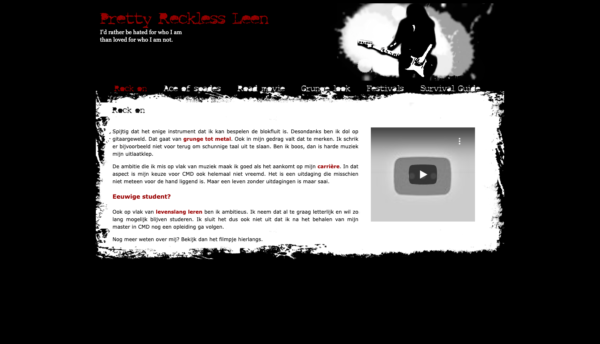
    Throwback to 2010, when I was getting my master’s in audiovisual arts. Back then, I was tasked with coding & designing my first website. Let’s just say I’ve grown a lot since then…

    While I had dabbled in web design and development when I was still majoring in marketing, this assignment was on a whole other level. From coming up with a concept that highlights my personality and designing something around that to writing copy and finally coding the website. Seems pretty basic right now, but these were truely the first steps I took into concepting, design, coding and copywriting.

    While I do find it quite cringeworthy (Those pics! That copy! That design!), there are a few similarities with my current style. My love of dark colors and the grunge style and my wit in writing to name a few. Anyways, I do feel like I’ve come a long way since then.